








How to write product docs
Contents
This guide explains how to write and structure your product's documentation.
Docs categories
We've created a standard, flexible structure for product docs. Each section contains specific types of pages that serve different purposes in the developer journey.
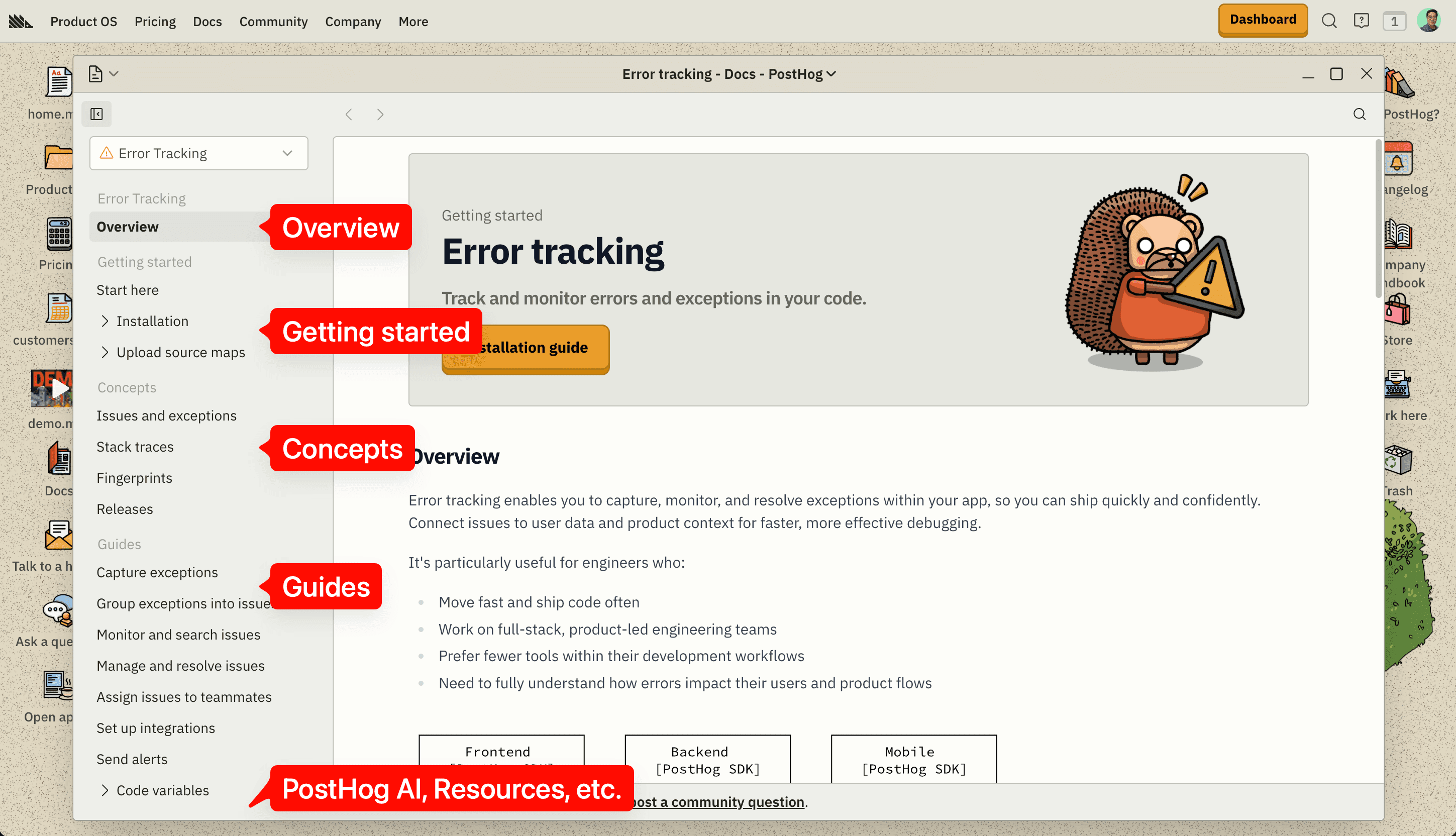
Every docs page should fit into one of the following categories:
- Overview – The landing page for your product docs. Think of it as a one-pager for your product.
- Getting started – Docs that focus on the minimal tasks and context necessary to get your product up and running.
- Concepts – Docs that explain the core abstractions and building blocks of your product.
- Guides – Tutorials on how to use your product's features.
- PostHog AI – Docs on how to use PostHog AI or AI workflows with your product.
- Resources – Standalone docs that don't fit into the other categories like pricing or changelog.
We recommend using Error Tracking docs as a reference. We've invested significant time in their docs and consider them to be the strongest example of well-structured documentation. It's a good template to use when writing docs for new products or improving existing ones.
Disclaimer: PostHog has a wide variety of products. For example, Data Pipelines is integration heavy while PostHog AI and Workflows are UI-oriented. They require different content structures for their docs, and that's okay. You can adapt this structure to your product's needs.
That said, stick to this structure first. It’s worked well for other products, both in terms of docs-to-product conversion and user feedback, so it’s proven to be effective.
Sidebar navigation
This sidebar navigation mirrors the docs structure. The hierarchy drives how users discover and navigate docs.
Overview
The Overview page is the landing page for your product docs. Think of it like a book cover for your product. People will judge your product based on a quick glance.
The overview needs to work like an effective one-pager. Imagine a busy engineering manager who's evaluating multiple solutions. Someone sends them a link to your product docs. With a quick scan, they need to confirm basic criteria before deciding to learn more or bounce:
- What is this product?
- Is it compatible with my tech stack?
- Does it have the essential features I expect or need?
Example - Error Tracking overview
Your Overview page should include:
- Description of the product and its value proposition
- List of key features and capabilities
- List of supported languages, frameworks, and integrations
- List of PostHog platform, cross-product features
- CTAs for next steps in the docs
- Visual components and elements to make it scannable and appealing
Getting started
The Getting started section in your product docs exists to get new users up and running with your product as quickly as possible and with just enough context for them to understand what's going on. It needs to be streamlined for minimal setup.
Avoid including advanced or more complex features in the getting started section. Those should go into the guides section.
Your Getting started section should include:
- A Start here page
- Installation quickstarts
- Basic config quickstarts (optional) (e.g. upload source maps)
Start here
The Start here page shows the product adoption journey at a high-level. It gives readers an overview of the milestones necessary to be successful with your product, like the quest log of a video game.
It acts as a syllabus. Users are more willing to invest their effort and time when they can see what they’re signing up for. Otherwise, one setback – a missing link or an outdated config – can be enough for users to give up if they don't know how far along they are in the process.
These pages are high converting pages for our paid ads, so they matter. Use the QuestLog component to create a visual roadmap that guides users through adoption milestones.
Example - Error Tracking start here page
Your Start here page should include:
QuestLogItemsections for each milestone in the adoption journey- Screenshots and media
- Links to deeper docs
- Use for free section at the end
Installation
The installation pages are quickstarts for your product. An installation page using the <Steps> component should be created for each platform, framework, or language your product supports.
Installation docs have a special architecture; they render the same content as the in-app onboarding flow from the monorepo. The single source of truth lives in the posthog/posthog monorepo, and the website pulls the content automatically. But it requires some boilerplate code to set up.
See the onboarding docs handbook for full details on how to create or migrate installation guides to the shared rendering architecture.


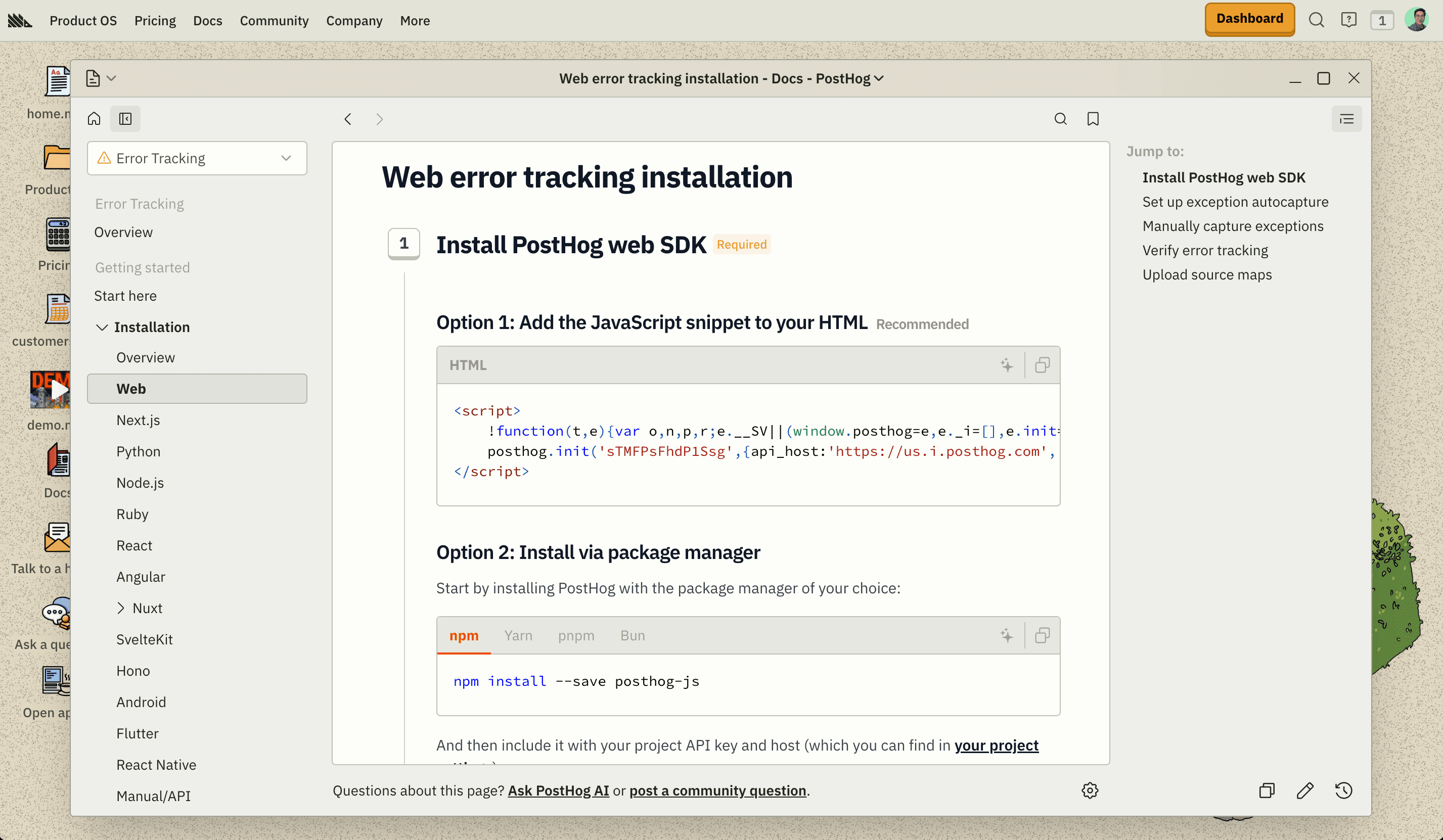
Example - Error Tracking installation docs
Your Installation section should include:
- Installation index page of all supported platforms
- Installation quickstarts for each framework or language using
<Steps>component
The installation index page displays a grid of platform cards (i.e. frameworks and languages) that's automatically generated from the sidebar navigation with logos and icons.
- The index page imports a snippet that calls
usePlatformList().- The hook reads all MDX files in the installation folder.
- It sorts them based on the order defined in
src/navs/index.js.- Each platform's logo comes from the
platformLogofrontmatter field.
Concepts
The Concepts section explains your product's core abstractions or building blocks in depth. Concept pages help readers understand how your product is designed to work and the underlying mental model.
The goal is to explain to readers why the product behaves the way it does, not just how to use it.
If your product uses any terminology that carries specific meaning or implies functionality, it probably deserves a concept page. Some concepts are shared across an industry, others are specific or adapted to your product. For example, in Error Tracking, we have concept pages for:
- Exceptions: an industry-wide concept
- Stack traces: an industry-wide concept
- Issues: a PostHog-specific concept (group of exceptions in the app UI)
- Fingerprints: a PostHog-specific concept (low-level identifier for exceptions on SDK capture)
Use Mermaid diagrams for data flows and relationships, tables for definitions, and screenshots for in-app UI elements.


Examples - Fingerprints, Issues and exceptions, Stack traces, Releases
Your Concepts section should include:
- In-depth explainers for each product concept
- Mermaid diagrams for data flows and relationships
- Tables for definitions with context
Guides
The Guides section contains tutorials for your product's features. These pages are framed around accomplishing specific use cases, jobs-to-be-done, or goals with your product.
Why call this section "Guides" instead of "Features"? Because it's task-oriented and focuses on outcomes. We want to avoid listing out a bunch of branded feature names in the sidebar: they don't mean anything to the user. What your product feature is called is secondary to what it enables, which is to help users solve their problems.
In general, there should be one page for each major feature or workflow in your product. On each page, include a brief intro explaining what the guide helps you do, instructions on how to use the feature in practice, and screenshots of the UI.


Examples - Capture exceptions, Manage and resolve issues, Send alerts, Set up integrations
Your Guides section should include:
- Guides for each major feature or workflow in your product
- Screenshots showing the feature in the UI
- Step-by-step or general instructions on how to use the feature
- A use case or jobs-to-be-done framing for the guide
PostHog AI
The PostHog AI section showcases your product's AI workflows. This includes integrations with our official PostHog AI product, MCP-based workflows, or examples of useful prompts or skills.
We don't want to be too prescriptive here. The goal is to show off your product's AI capabilities, small or big.


Example - Error Tracking PostHog AI docs
Your PostHog AI section should include:
- Guides for PostHog AI features your product supports
- Guides for AI workflows like MCP
- Guides for AI resources like recommended prompts or skills
Resources
The Resources section is where the useful “lookup” stuff lives. These are important but standalone pages like pricing, changelog, troubleshooting, and API or SDK references.
If something doesn't fit neatly into the other categories, it belongs here.


Example - Error Tracking resources
Your Resources section should include:
- Pricing page
- Troubleshooting page
- Changelog page
- Links to SDK and API references
- Other resources
Pricing
The Pricing page explains the product's pricing model, free tier limits, and how usage is calculated. Transparency is a differentiator for us, so we want to be clear and upfront about how much users will pay.
Just as importantly, we want to show users how to stay in control of costs. This page should include advice on how users can reduce their bill and cut costs.
Example - Error Tracking pricing
Your Pricing page should include:
<SingleProductPricing>calculator component- Breakdown of how usage or costs are calculated
- Section on how to reduce and cut costs
Troubleshooting
Common issues and solutions that unblock users who are stuck. Keep this updated based on support tickets and community questions.
Start with the <AskAIInput> component to enable AI chat support, then use searchable headings with numbered solutions. Each section should be scannable and actionable.
Example - Error Tracking troubleshooting
Changelog
Displays changelog entries for your product using the <ProductChangelog> component. It filters entries from the main /changelog page.
Example - Error Tracking changelog
API and SDK references
Links to SDK reference docs and API documentation filtered by product.
Example - Error Tracking references